# Class Component Life Cycle

> The actual source code contents comes from [Ohans Emmanuel](https://blog.logrocket.com/author/ohansemmanuel/) blog.
>
> If you have interests, you can check blog for more interesting content .

## What is the React component lifecycle? <a href="#whatisthereactcomponentlifecycle" id="whatisthereactcomponentlifecycle"></a>

What are the **lifecycle** methods in **React**? To put it simply, the React component **lifecycle** can be thought of as a component's "lifetime." **Lifecycle** methods are a series of events that occur during a React component's birth, growth, and death.

In React, components go through a **lifecycle** of events:

1. Mounting (adding nodes to the **DOM**)
2. Updating (altering existing nodes in the **DOM**)
3. Unmounting (removing nodes from the **DOM**)
4. Error handling (verifying that your code works and is bug-free)

{% hint style="info" %}
**SInce React 16.8.\* and the introduction of hooks , React component life cycles become implicit working under the hood, That's why we will tackle the life cycles on the class components examples , where we can invoke them explicitly.**

**Note that we will use functional components mainly 99% time even React team is recommending that. but for deep understanding of how our components live inside our app we will use in this section only class components** &#x20;
{% endhint %}

`Mounting`, `updating`, and `unmounting` are the three main steps that each component goes through. You might conceive of it as component natural life cycle: they get born (mount), get to live (update), and get to die (unmount).&#x20;

**Mounting** a component is parallel to bringing a newborn baby into the world. This is the component's first experience with life. At this point, the component, which is mostly made up of your code and React's source code, is inserted into the **DOM**.

During the **updating** phase, the React component "grows" after the **mounting** phase. Without updates, the component would remain in the **DOM** as it was when it was first created. As you might expect, many of the components you write until now will require updating, whether through a change in **state** or **props**. As a result, they must also go through the **updating** process.

The final phase is called the **unmounting** phase. At this stage, the component “dies”. In React jargon , it is removed from  the **DOM**.

There’s one more phase a React component can go through: the **error handling** phase. This occurs when your code doesn’t run or there’s a bug somewhere.&#x20;

{% hint style="warning" %}
**Note that a React component may not go through every phase. For example, a component could be mounted one minute and then unmounted the next   without any updates or error handling.**&#x20;
{% endhint %}

## React lifecycle methods? <a href="#whatarereactlifecyclemethods" id="whatarereactlifecyclemethods"></a>

Each React lifecycle phase has a set of lifecycle methods that you can override to run code at specific points throughout the process. These are commonly referred to as component lifecycle methods.

The diagram below shows the React lifecycle methods.associated with the mounting, updating, umounting :

{% embed url="<https://projects.wojtekmaj.pl/react-lifecycle-methods-diagram>" %}
Credits : Wojciech Maj
{% endembed %}

### Mounting lifecycle methods <a href="#mounting" id="mounting"></a>

The mounting phase refers to the phase during which a component is created and inserted to the DOM.

The following methods are called in order.

#### **constructor()** <a href="#constructor" id="constructor"></a>

The <mark style="color:blue;">**constructor()**</mark> is the very first method called as the component is “brought to life.”

Before the component is mounted to the DOM, the constructor method is called. In most cases, the constructor method would be used to initialize state and bind event handler methods.

Here’s a quick example of the `constructor()` React lifecycle method in action:

```jsx
const MyComponent extends React.Component {
  constructor(props) {
   super(props) 
    this.state = {
       characterName="Mighty component"
    ifePoints: 0
    }  
    this.handlePoints = this.handlePoints.bind(this) 
    }   
}
```

It’s worth reiterating that this is the first method invoked   before the component is mounted to the DOM. The constructor is not where you would introduce any side effects or subscriptions, such as event handlers.

#### static getDerivedStateFromProps() <a href="#staticgetderivedstatefromprops" id="staticgetderivedstatefromprops"></a>

`static getDerivedStateFromProps` is a new React lifecycle method as of [React 17](https://medium.com/@valerii.sukhov/react-17-lifecycle-5b68946c813c) designed to replace `componentWillReceiveProps`.

Its main function is to ensure that the state and props are in sync for when it’s required.

The basic structure of the `static getDerivedStateFromProps()` looks like this:

```jsx
const MyComponent extends React.Component {
  ... 

  static getDerivedStateFromProps() {
//do stuff here
  }  
}
```

`static getDerivedStateFromProps()` takes in `props` and `state`:

```jsx
... 

  static getDerivedStateFromProps(props, state) {
//do stuff here
  }  

...
```

You can return an object to update the state of the component:

```jsx
... 

  static getDerivedStateFromProps(props, state) { 
     return {
        points: 200 // update state with this
     }
  }  

  ...
```

Or you can return null to make no updates:

```jsx
... 

  static getDerivedStateFromProps(props, state) {
    return null
  }  

...
```

Why exactly is this lifecycle method important? While `static getDerivedStateFromProps()` is a rarely used lifecycle method, it comes in handy in certain scenarios.

Remember, this method is called (or invoked) before the component is rendered to the DOM on initial mount.

Here’s a quick example so you can see the `static getDerivedStateFromProps()` method in action. Consider a simple component that renders the number of points scored by a football team. As you may expect, the number of points is stored in the component state object:

```jsx
class App extends Component {
  state = {
    points: 10
  }

  render() {
    return (
      <div className="App">
        <header className="App-header">
          <img src={logo} className="App-logo" alt="logo" />
          <p>
            You've scored {this.state.points} points.
          </p>
        </header>
      </div>
    );
  }
}
```

The text reads, “you have scored 10 points”  where 10 is the number of points in the state object.

Let’s look at another example. If you put in the `static getDerivedStateFromProps` method as shown below, what number of points would be rendered?

```jsx
class App extends Component {
  state = {
    points: 10
  }
    
  // *******
  //  NB: Not the recommended way to use this method. Just an example. Unconditionally overriding state here is generally considered a bad idea
  // ********
  static getDerivedStateFromProps(props, state) {
    return {
      points: 1000
    }
  }
  
  render() {
    return (
      <div className="App">
        <header className="App-header">
          <img src={logo} className="App-logo" alt="logo" />
          <p>
            You've scored {this.state.points} points.
          </p>
        </header>
      </div>
    );
  }
}
```

Right now, we have the `static getDerivedStateFromProps` component lifecycle method in there. If you remember from the previous explanation, this method is called before the component is mounted to the DOM. By returning an object, we update the state of the component before it is even rendered.

Here’s what we get:

![static getDerivedStateFromProps() Example](https://blog.logrocket.com/wp-content/uploads/2019/01/static-getDerivedStateFromProps-react-lifecycle-example-2.png)

The `1000` comes from updating state within the `static getDerivedStateFromProps` method.

This example is contrived and not really representative of the way you’d use the `static getDerivedStateFromProps` method. But I think it’s helpful for understanding the basics.

With this lifecycle method, just because you can update state doesn’t mean you should. There are specific use cases for the `static getDerivedStateFromProps` method. If you use it in the wrong context, you’ll be solving a problem with the wrong tool.

So when should you use the `static getDerivedStateFromProps` lifecycle method?

The method name `getDerivedStateFromProps` comprises five words: get derived state from props. Essentially, `static getDerivedStateFromProps` allows a component to update its internal state in response to a change in props.

![](/files/ocfAPPbts0whNuRMrMDL)

Component state in this manner is referred to as [derived state](https://reactjs.org/blog/2018/06/07/you-probably-dont-need-derived-state.html#when-to-use-derived-state).

As a rule of thumb, derived state should be used sparingly as you can introduce [subtle bugs](https://reactjs.org/blog/2018/06/07/you-probably-dont-need-derived-state.html#common-bugs-when-using-derived-state) into your application if you aren’t sure of what you’re doing.

#### 3. `render()` <a href="#render1" id="render1"></a>

After the `static getDerivedStateFromProps` method is called, the next lifecycle method in line is the `render` method:

```jsx
class MyComponent extends React.Component {
// render is the only required method for a class component 
   render() {
    return <h1> Hurray! </h1>
   }
}
```

If you want to render elements to the DOM, — e.g., returning some `JSX` — the `render` method is where you would write this (as shown above).

You could also return plain strings and numbers, as shown below:

```jsx
class MyComponent extends React.Component {
   render() {
    return "Hurray" 
   }
}
```

Or, you could return arrays and fragments:

```jsx
class MyComponent extends React.Component {
   render() {
    return [
          <div key="1">Hello</div>,
          <div key="2" >World</div>
      ];
   }
}
```

```jsx
class MyComponent extends React.Component {
   render() {
    return <React.Fragment>
            <div>Hello</div>
            <div>World</div>
      </React.Fragment>
   }
}
```

If you don’t want to render anything, you could return a boolean or `null` within the render method:

```jsx
class MyComponent extends React.Component { 
   render() {
    return null
   }
}

class MyComponent extends React.Component {
  // guess what's returned here? 
  render() {
    return (2 + 2 === 5) && <div>Hello World</div>;
   }
}
```

Lastly, you could return a [portal](https://reactjs.org/docs/portals.html) from the render method:

```jsx
class MyComponent extends React.Component {
  render() {
    return createPortal(this.props.children, document.querySelector("body"));
  }
}
```

An important thing to note about the render method is that the render function should be pure i.e do not attempt to use `setState`or interact with the external APIs.

#### 4. `componentDidMount()` <a href="#componentdidmount" id="componentdidmount"></a>

After `render` is called, the component is mounted to the DOM and the `componentDidMount` method is invoked.

This function is invoked immediately after the component is mounted to the DOM.

You would use the `componentDidMount` lifecycle method to grab a DOM node from the component tree immediately after it’s mounted.

For example, let’s say you have a modal and want to render the content of the modal within a specific DOM element:

```jsx
class ModalContent extends React.Component {

  el = document.createElement("section");

  componentDidMount() {
    document.querySelector("body).appendChild(this.el);
  }
  
  // using a portal, the content of the modal will be rendered in the DOM element attached to the DOM in the componentDidMount method. 

}
```

If you also want to make network requests as soon as the component is mounted to the DOM, this is a perfect place to do so:

```jsx
componentDidMount() {
  this.fetchListOfTweets() // where fetchListOfTweets initiates a netowrk request to fetch a certain list of tweets.
}
```

You could also set up subscriptions such as timers. Here’s an example:

```jsx
// e.g requestAnimationFrame 
componentDidMount() {
    window.requestAnimationFrame(this._updateCountdown);
 }

// e.g event listeners 
componentDidMount() {
    el.addEventListener()
}
```

Just make sure to cancel the subscription when the component unmounts. I’ll show you how to do this when we discuss the `componentWillUnmount` lifecycle method.

### Updating lifecycle methods <a href="#updating" id="updating"></a>

Whenever a change is made to the `state` or `props` of a React component, the component is rerendered. In simple terms, the component is updated. This is the updating phase of the React component lifecycle.

So what lifecycle methods are invoked when the component is to be updated?

#### 1. `static getDerivedStateFromProps()` <a href="#staticgetderivedstatefromprops2-class" id="staticgetderivedstatefromprops2-class"></a>

The `static getDerivedStateFromProps` is the first React lifecycle method to be invoked during the updating phase. I already explained this method in the mounting phase, so I’ll skip it.

We already explained this method when reviewing the mounting lifecycle phase. What’s important to note is that this method is invoked in both the mounting and updating phases.

#### 2. `shouldComponentUpdate()` <a href="#shouldcomponentupdate" id="shouldcomponentupdate"></a>

Once the `static getDerivedStateFromProps` method is called, the `shouldComponentUpdate` method is called next.

In most cases, you’ll want a component to rerender when state or props changes. However, you do have control over this behavior.

![](/files/AAxW3udTZoor04Fl1W4m)

Within this lifecycle method, you can return a boolean  —  `true` or `false` — and control whether the component gets rerendered (e.g., upon a change in state or props).

This lifecycle method is mostly used for performance optimization measures. However, this is a very common use case, so you could use the built-in [`React.PureComponent`](https://reactjs.org/docs/react-api.html#reactpurecomponent) when you don’t want a component to rerender if the `state`and `props` don’t change.

#### 3. `render()` <a href="#render2" id="render2"></a>

After the `shouldComponentUpdate` method is called, `render` is called immediately afterward, depending on the returned value from `shouldComponentUpdate`, which defaults to `true` .

#### 4. `getSnapshotBeforeUpdate()` <a href="#getsnapshotbeforeupdate" id="getsnapshotbeforeupdate"></a>

The [`getSnapshotBeforeUpdate`lifecycle method](https://blog.logrocket.com/how-is-getsnapshotbeforeupdate-implemented-with-hooks/) stores the previous values of the state after the DOM is updated. `getSnapshotBeforeUpdate()` is called right after the `render` method.

Most likely, you’ll rarely reach for this lifecycle method. But it comes in handy when you need to grab information from the DOM (and potentially change it) just after an update is made.

Here’s the important thing: the value queried from the DOM in `getSnapshotBeforeUpdate` refers to the value just before the DOM is updated, even though the `render` method was previously called.

Think about how you use version control systems, such as [Git](https://git-scm.com/). A basic example is that you write code and stage your changes before pushing to the repo.

Let’s assume the render function was called to stage your changes before actually pushing to the DOM. Before the actual DOM update, information retrieved from `getSnapshotBeforeUpdate` refers to those before the actual visual DOM update.

Actual updates to the DOM may be asynchronous, but the `getSnapshotBeforeUpdate` lifecycle method is always called immediately before the DOM is updated.

This is a tricky method, so let’s look at another example.

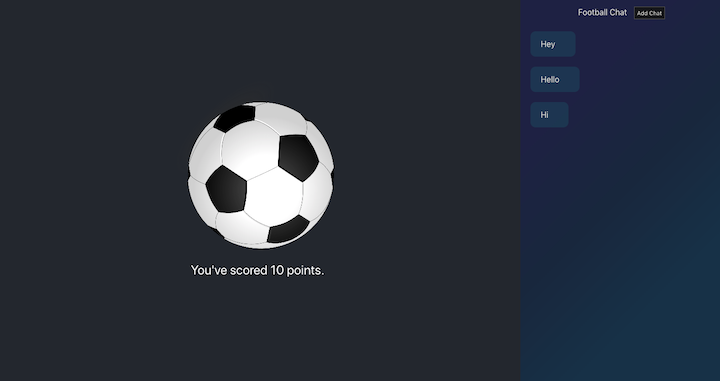
A classic case where the `getSnapshotBeforeUpdate` lifecycle method comes in handy is in a chat application. I’ve gone ahead and added a chat pane to the previous example app:
![getSnapshotBeforeUpdate React Lifecycle Method Example](https://blog.logrocket.com/wp-content/uploads/2019/01/getSnapshotBeforeUpdate-react-lifecycle-methods-example.png)

The implementation of the chat pane is as simple as it looks. Within the `App` component is an unordered list with a `Chats` component:

```jsx
<ul className="chat-thread">
    <Chats chatList={this.state.chatList} />
 </ul>
```

The `Chats` component renders the list of chats, and for this, it needs a `chatList` prop. This is basically an Array. In this case, an array of 3 string values, `["Hey", "Hello", "Hi"]`.

The `Chats` component has a simple implementation as follows:

```jsx
class Chats extends Component {
  render() {
    return (
      <React.Fragment>
        {this.props.chatList.map((chat, i) => (
          <li key={i} className="chat-bubble">
            {chat}
          </li>
        ))}
      </React.Fragment>
    );
  }
}
```

It just maps through the `chatList` prop and renders a list item which is in turn styled to look like a chat bubble :).

Within the chat pane header is an **Add Chat** button:

![getSnapshotBeforeUpdate Example With Button](https://blog.logrocket.com/wp-content/uploads/2019/01/getSnapshotBeforeUpdate-button.png)

Clicking this button will add a new chat text, “Hello”, to the list of rendered messages.

Here’s that in action:

![getSnapshotBeforeUpdate Example With Chat](https://blog.logrocket.com/wp-content/uploads/2019/01/getSnapshotBeforeUpdate-chat-messages.gif)

The problem here, as with most chat applications is that whenever the number of chat messages exceeds the available height of the chat window, the expected behavior is to auto-scroll down the chat pane so that the latest chat message is visible. That’s not the case now:

![getSnapshotBeforeUpdate Example With Scroll Behavior](https://blog.logrocket.com/wp-content/uploads/2019/01/getSnapshotBeforeUpdate-scroll.gif)

Let’s see how we may solve this using the `getSnapshotBeforeUpdate` lifecycle method.

The way the `getSnapshotBeforeUpdate` lifecycle method works is that when it is invoked, it gets passed the previous props and state as arguments.

So we can use the `prevProps` and `prevState` parameters as shown below:

```jsx
getSnapshotBeforeUpdate(prevProps, prevState) {
   
}
```

Within this method, you’re expected to either return a value or `null`:

```jsx
getSnapshotBeforeUpdate(prevProps, prevState) {
   return value || null // where 'value' is a  valid JavaScript value    
}
```

Whatever value is returned here is then passed on to another lifecycle method. You’ll see what I mean soon.

The `getSnapshotBeforeUpdate` React lifecycle method doesn’t work on its own. It is meant to be used in conjunction with the `componentDidUpdate` lifecycle method.

#### 5. `componentDidUpdate()` <a href="#componentdidupdate" id="componentdidupdate"></a>

The `componentDidUpdate` lifecycle method is invoked after the `getSnapshotBeforeUpdate`. As with the `getSnapshotBeforeUpdate` method it receives the previous props and state as arguments:

```jsx
componentDidUpdate(prevProps, prevState) {
 
}
```

However, that’s not all.

Whatever value is returned from the `getSnapshotBeforeUpdate` lifecycle method is passed as the third argument to the `componentDidUpdate` method.

Let’s call the returned value from `getSnapshotBeforeUpdate`, snapshot, and here’s what we get thereafter:

```jsx
componentDidUpdate(prevProps, prevState, snapshot) {
 
}
```

With this knowledge, let’s solve the chat auto scroll position problem.

To solve this, I’ll need to remind (or teach) you some DOM geometry. So bear with me.

In the meantime, here’s all the code required to maintain the scroll position within the chat pane:

```jsx
getSnapshotBeforeUpdate(prevProps, prevState) {
    if (this.state.chatList > prevState.chatList) {
      const chatThreadRef = this.chatThreadRef.current;
      return chatThreadRef.scrollHeight - chatThreadRef.scrollTop;
    }
    return null;
  }

  componentDidUpdate(prevProps, prevState, snapshot) {
    if (snapshot !== null) {
      const chatThreadRef = this.chatThreadRef.current;
      chatThreadRef.scrollTop = chatThreadRef.scrollHeight - snapshot;
    }
  }
```

Here’s the chat window:

![](https://storage.googleapis.com/blog-images-backup/1*xKPOdMA9C1fsBMNeDBr9Dg.png)

However, the graphic below highlights the actual region that holds the chat messages (the unordered list, `ul` which houses the messages):

![](https://storage.googleapis.com/blog-images-backup/1*g1LuWGX0le9k91WSOCvjaQ.png)

It is this `ul` we hold a reference to using a React Ref.

```jsx
<ul className="chat-thread" ref={this.chatThreadRef}>
   ...
</ul>
```

First off, because `getSnapshotBeforeUpdate` may be triggered for updates via any number of props or even a state update, we wrap to code in a conditional that checks if there’s indeed a new chat message:

```jsx
getSnapshotBeforeUpdate(prevProps, prevState) {
    if (this.state.chatList > prevState.chatList) {
      // write logic here
    }
    
  }
```

The `getSnapshotBeforeUpdate` has to return a value. If no chat message was added, we will just return `null`:

```jsx
getSnapshotBeforeUpdate(prevProps, prevState) {
    if (this.state.chatList > prevState.chatList) {
      // write logic here
    }
    return null 
}
```

Now consider the full code for the `getSnapshotBeforeUpdate` method:

```jsx
getSnapshotBeforeUpdate(prevProps, prevState) {
    if (this.state.chatList > prevState.chatList) {
      const chatThreadRef = this.chatThreadRef.current;
      return chatThreadRef.scrollHeight - chatThreadRef.scrollTop;
    }
    return null;
  }
```

First, consider a situation where the entire height of all chat messages doesn’t exceed the height of the chat pane:

![](/files/AvNiNgBPQz1QCIdNlE9m)

Here, the expression `chatThreadRef.scrollHeight - chatThreadRef.scrollTop`will be equivalent to `chatThreadRef.scrollHeight - 0`.

When this is evaluated, it’ll be equal to the [`scrollHeight`](https://developer.mozilla.org/en-US/docs/Web/API/Element/scrollHeight) of the chat pane — just before the new message is inserted to the DOM.

If you remember from the previous explanation, the value returned from the `getSnapshotBeforeUpdate` method is passed as the third argument to the `componentDidUpdate` method. We call this `snapshot`:

```
componentDidUpdate(prevProps, prevState, snapshot) {
    
 }
```

The value passed in here — at this time, is the previous `scrollHeight` before the update to the DOM.

In the `componentDidUpdate` we have the following code, but what does it do?

```jsx
componentDidUpdate(prevProps, prevState, snapshot) {
    if (snapshot !== null) {
      const chatThreadRef = this.chatThreadRef.current;
      chatThreadRef.scrollTop = chatThreadRef.scrollHeight - snapshot;
    }
  }
```

In actuality, we are programmatically scrolling the pane vertically [from the top down](https://developer.mozilla.org/en-US/docs/Web/API/Element/scrollTop), by a distance equal to `chatThreadRef.scrollHeight - snapshot;`.

Since `snapshot` refers to the `scrollHeight` before the update, the above expression returns the height of the new chat message plus any other related height owing to the update. Please see the graphic below:

![](/files/uAb3ct0DKGHjUMR0QUfU)

When the entire chat pane height is occupied with messages (and already scrolled up a bit), the `snapshot` value returned by the `getSnapshotBeforeUpdate` method will be equal to the actual height of the chat pane:

![](/files/FuTJ1JrKpEpO1kweJjTy)

The computation from `componentDidUpdate` will set to `scrollTop` value to the sum of the heights of extra messages, which is exactly what we want.

![](/files/eWZVdjk0P58i8HpwoSfr)

If you got stuck, I’m sure going through the explanation (one more time) or checking the source code will help clarify your questions. You can also use the comments section to ask me.

### Unmounting lifecycle method <a href="#unmounting" id="unmounting"></a>

The following method is invoked during the component unmounting phase:

#### `componentWillUnmount()` <a href="#componentwillunmount" id="componentwillunmount"></a>

The `componentWillUnmount` lifecycle method is invoked immediately before a component is unmounted and destroyed. This is the ideal place to perform any necessary cleanup such as clearing up timers, cancelling network requests, or cleaning up any subscriptions that were created in `componentDidMount()` as shown below:

```jsx
// e.g add event listener
componentDidMount() {
    el.addEventListener()
}

// e.g remove event listener 
componentWillUnmount() {
    el.removeEventListener()
 }
```

### Error handling lifecycle methods <a href="#errorhandling" id="errorhandling"></a>

When things go bad in your code, errors are thrown. The following methods are invoked when an error is thrown by a descendant component (i.e., a component below them).

Let’s implement a simple component to catch errors in the demo app. For this, we’ll create a new component called `ErrorBoundary`.

Here’s the most basic implementation:

```jsx
import React, { Component } from 'react';

class ErrorBoundary extends Component {
  state = {};
  render() {
    return null;
  }
}

export default ErrorBoundary;
```

#### `static getDerivedStateFromError()` <a href="#getderivedstatefromerror" id="getderivedstatefromerror"></a>

Whenever an error is thrown in a descendant component, this method is called first, and the error thrown passed as an argument.

Whatever value is returned from this method is used to update the state of the component.

Let’s update the `ErrorBoundary` component to use this lifecycle method:

```jsx
import React, { Component } from "react";
class ErrorBoundary extends Component {
  state = {};

  static getDerivedStateFromError(error) {
    console.log(`Error log from getDerivedStateFromError: ${error}`);
    return { hasError: true };
  }

  render() {
    return null;
  }
}

export default ErrorBoundary;
```

Right now, whenever an error is thrown in a descendant component, the error will be logged to the console, `console.error(error)`, and an object is returned from the `getDerivedStateFromError` method. This will be used to update the state of the `ErrorBoundary` component i.e with `hasError: true`.

#### componentDidCatch() <a href="#componentdidcatch" id="componentdidcatch"></a>

The `componentDidCatch` method is also called after an error in a descendant component is thrown. Apart from the `error` thrown, it is passed one more argument which represents more information about the error:

```jsx
componentDidCatch(error, info) {
    logToExternalService(error, info) // this is allowed. 
        //Where logToExternalService may make an API call.
}
```

In this method, you can send the `error` or `info` received to an external logging service. Unlike `getDerivedStateFromError`, the `componentDidCatch`allows for side-effects:

```jsx
componentDidCatch(error, info) {
    logToExternalService(error, info) // this is allowed. 
        //Where logToExternalService may make an API call.
}
```

Let’s update the `ErrorBoundary` component to use this lifecycle method:

```jsx
import React, { Component } from "react";
class ErrorBoundary extends Component {
  state = { hasError: false };

  static getDerivedStateFromError(error) {
    console.log(`Error log from getDerivedStateFromError: ${error}`);
    return { hasError: true };
  }

  componentDidCatch(error, info) {
    console.log(`Error log from componentDidCatch: ${error}`);
    console.log(info);
  }

  render() {
    return null
  }
}

export default ErrorBoundary;
```

Also, since the `ErrorBoundary` can only catch errors from descendant components, we’ll have the component render whatever is passed as `Children` or render a default error UI if something went wrong:

```
... 

render() {
    if (this.state.hasError) {
      return <h1>Something went wrong.</h1>;
    }

    return this.props.children;
}
```

{% embed url="<https://codesandbox.io/s/life-cycles-yxpiym>" %}

{% embed url="<https://reactjs.org/docs/state-and-lifecycle.html#gatsby-focus-wrapper>" %}

{% embed url="<https://reactjs.org/docs/state-and-lifecycle.html#adding-lifecycle-methods-to-a-class>" %}

## Lifecycle Simulators

I just wanted to share one of the best example of lifecycle Similator by ReactFactory.com&#x20;

a very good visual representation for the React component Life cycles&#x20;

{% embed url="<https://reactarmory.com/guides/lifecycle-simulators>" %}

{% embed url="<https://blog.logrocket.com/react-lifecycle-methods-tutorial-examples>" %}


---

# Agent Instructions: Querying This Documentation

If you need additional information that is not directly available in this page, you can query the documentation dynamically by asking a question.

Perform an HTTP GET request on the current page URL with the `ask` query parameter:

```
GET https://maissen.gitbook.io/react-grimoire/react-fundamentals/class-component-life-cycle.md?ask=<question>
```

The question should be specific, self-contained, and written in natural language.
The response will contain a direct answer to the question and relevant excerpts and sources from the documentation.

Use this mechanism when the answer is not explicitly present in the current page, you need clarification or additional context, or you want to retrieve related documentation sections.
